Before you start
What you'll need
- A Tandem Mobi* pump paired with the Tandem Mobi* app on a phone, with a CGM paired to the pump
- Your Tandem Source* login
- Sugarmate by Tandem* on that phone (free, recommended)
- A Windows 10 or 11 PC, an Apple Silicon Mac, or an iPhone
Make sure your pump uploads to Tandem Source*
PumpDash stays up to date as long as the Tandem Mobi* app is running on the pump user's phone.
Install Sugarmate and connect Tandem Source*
RecommendedSugarmate by Tandem* is Tandem's* own app, and Tandem* is expected to bring more of these features into it in the future. Connecting it to Tandem Source* makes your pump update about every 5 minutes, give or take a few, instead of about once an hour. Glucose readings arrive with those uploads, so this one step keeps everything in PumpDash fresh.
Pump uploads to Tandem Source* in one hour
Give or take a few minutes. The pump, the phone and its connection set the exact timing.
- aOn the phone paired with the pump, download Sugarmate by Tandem* from the App Store or Google Play. It's free.
- bOpen Sugarmate and create your account.
- cAdd a data source, choose Tandem Source*, and sign in with your Tandem Source* login.
Why it matters
Fresher uploads mean glucose, insulin on board, insulin remaining and the last bolus are minutes old instead of up to an hour old, and you'll see fewer estimates.
Nothing to change in PumpDash
PumpDash learns your pump's upload rhythm and picks up the faster schedule on its own, checking right when each upload is due.
PumpDash never talks to Sugarmate; Sugarmate only makes your pump upload more often, and its own terms and privacy policy apply. PumpDash is not affiliated with, endorsed by, sponsored by or approved by Tandem Diabetes Care*, the maker of Sugarmate. Tandem Source* in Sugarmate isn't available in every region yet. Without it, PumpDash still works on the normal hourly uploads.
Install PumpDash
Install it on whichever screen you'll look at most. Many families use both: a small display on the desk and the phone app when they're out.
PumpDash is on its way to the Microsoft Store, the App Store and Google Play. Until a listing goes live, use the button on its card to hear when it's ready or to join the beta. See every platform.
Sign in with Tandem Source*
The setup wizard opens the first time you launch PumpDash.
- Sign in with the same Tandem Source* login you used in step 2. On iPhone you sign in on Tandem's* own page, so PumpDash never sees that password.
- It's the only account PumpDash needs: glucose and pump data both come from Tandem Source*.
- Your sign-in is checked as you enter it and saved in your system's secure storage, so you stay signed in.
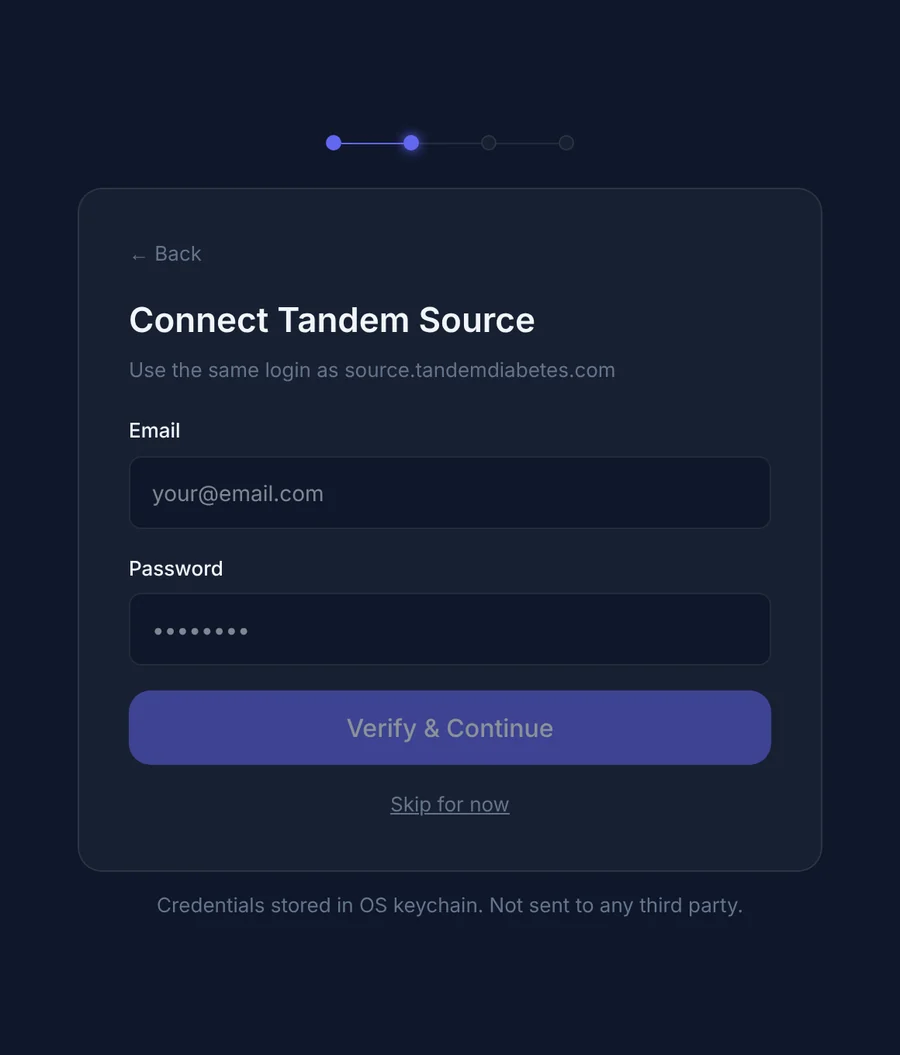
Want to look around first? Turn on Demo Mode to explore a simulated day with nothing connected.
Check it's working
- Glucose and pump values appear after the next upload to Tandem Source*, with their age shown beside them.
- With Sugarmate connected, the data age stays at a few minutes instead of climbing toward an hour.
- On desktop, Settings > Connection health shows the connection and how old its last data is.
Troubleshooting
If something looks off
Glucose and pump data still update about once an hour.
Open Sugarmate and check that Tandem Source* is listed as a connected data source, and that the Tandem Mobi* app is still running on the pump user's phone. Tandem Source* in Sugarmate isn't offered in every region yet; without it, the pump uploads on its normal hourly schedule.
PumpDash shows no glucose readings.
Glucose comes from the CGM readings the pump uploads to Tandem Source*. Check that the CGM is paired with the pump and showing readings there, and that the Tandem Mobi* app is running on the pump user's phone. Readings appear after the next upload.
The pump values say Late or look dim.
PumpDash is telling you the last upload is older than expected. It keeps checking on its own and updates as soon as the next upload reaches Tandem Source*.
Not a medical device.
PumpDash is not a medical device. Information it displays may be delayed, incomplete, estimated or unavailable. Never use it to calculate insulin doses or make treatment decisions; rely on your pump, CGM, meter, the official manufacturer apps and your healthcare team.
Not affiliated with or endorsed by Tandem Diabetes Care.
PumpDash is an independent app made by Hopes Tinkery LLC. It is not affiliated with, endorsed by, sponsored by or approved by Tandem Diabetes Care, Inc.